Importing from CSV
People → Import loads three kinds of CSV file. Each has a downloadable template whose columns map one-to-one to fields. The column tables below are generated from the same template definitions the server uses, so they match the version you run.
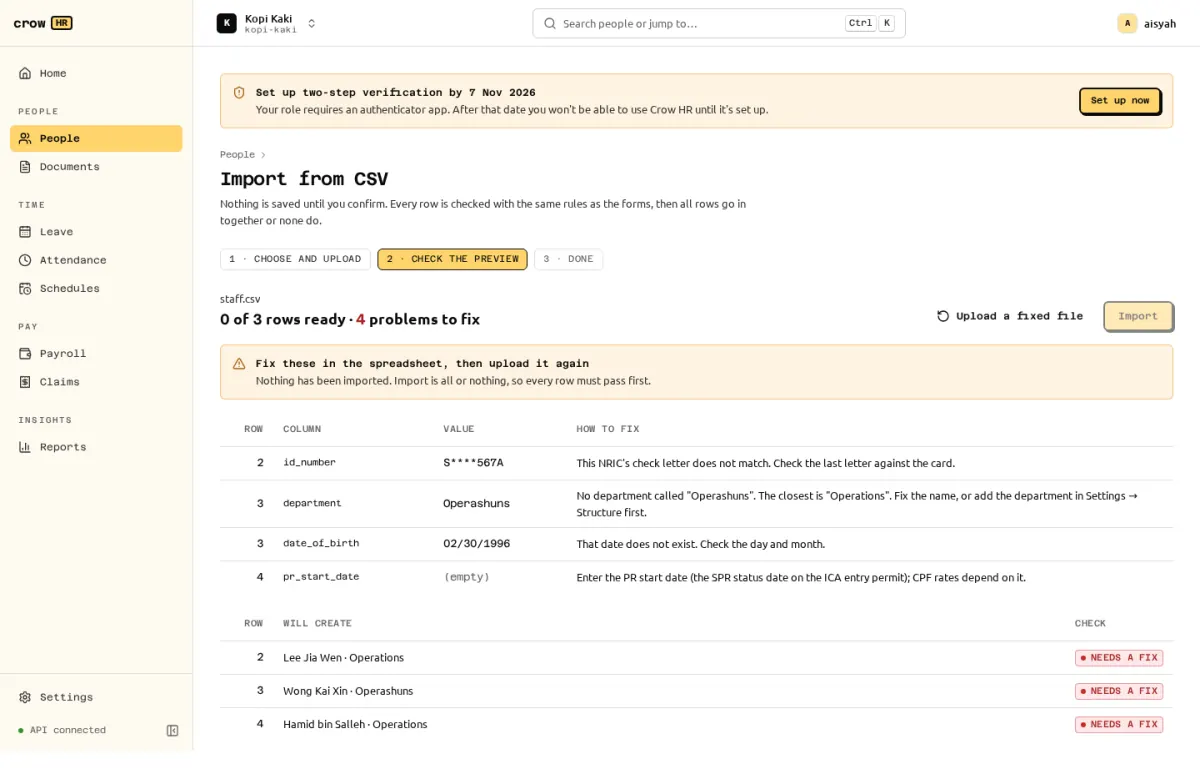
How an import works
Section titled “How an import works”- Download the template, fill it in a spreadsheet and save it as CSV (UTF-8, comma-separated, with the header row). At most 5 MB and 2,000 data rows.
- Upload it. Every row is checked with the same rules as the forms: NRIC/FIN check letters, required fields, existing department names (with the closest match suggested), dates, and so on.
- The preview lists the rows that will be created and every problem as row, column, value and how to fix it. NRIC/FIN values in the preview are masked.
- Nothing is saved until you confirm, and the confirm button stays disabled while any row has a problem. Fix the spreadsheet and Upload a fixed file.
- Confirming writes all rows in one transaction, or none.
Dates accept YYYY-MM-DD or DD/MM/YYYY only. Money is in dollars with up to 2 decimals (4000.00) and is stored as exact cents.
Employees
Section titled “Employees”Creates employees with their first employment record and, for payroll roles, their basic pay. Each new employee gets a sign-in invitation after you confirm (see members and roles). Foreigners need a work pass valid on the hire date.
Template file crowhr-employees-template-v1.csv (version 1), 31 columns.
| Column | Required | What to enter | Example |
|---|---|---|---|
employee_number | no | Leave empty to auto-number (E0001…). | |
legal_name | yes | As on the NRIC, FIN card or passport. | Tan Mei Ling |
preferred_name | no | The name they go by, e.g. Hafiz for Muhammad Hafiz bin Ismail. Used in greetings and the directory. Leave empty to use the legal name. | Mei Ling |
id_type | yes | nric, fin or other. | nric |
id_number | yes | NRIC/FIN with check letter, or passport number. | S1234567D |
date_of_birth | yes | YYYY-MM-DD or DD/MM/YYYY. | 12/04/1990 |
gender | no | female, male, other or undisclosed. | female |
nationality | no | Country name. | Singaporean |
residency_status | yes | citizen, pr or foreigner. | citizen |
pr_start_date | no | Required for pr: SPR status date on the ICA entry permit. | |
race | no | chinese, malay, indian, eurasian or other (SHG fund). | chinese |
religion | no | buddhism, christianity, islam, hinduism, taoism, sikhism, other, none or undisclosed. | buddhism |
work_email | no | Used for the sign-in invitation. | [email protected] |
personal_email | no | ||
mobile | no | 8-digit SG number or +country code. | 91234567 |
hire_date | yes | First day of work. | 2026-01-05 |
job_title | yes | Account Executive | |
department | yes | Must match an existing department name. | Sales |
team | no | Existing team name. | |
location | no | Existing location name. | |
cost_centre | no | Existing cost centre code. | |
manager_employee_number | no | Employee number of the manager (existing, or earlier in this file). | |
employment_type | yes | full_time, part_time, contract or intern. | full_time |
work_schedule | no | Schedule name; empty = the default schedule. | |
probation_end | no | YYYY-MM-DD or DD/MM/YYYY. | |
pay_basis | no | monthly or hourly. Needs payroll access. | monthly |
basic_pay | no | Dollars, up to 2 decimals. Needs payroll access. | 4000.00 |
pass_type | no | Foreigners: EP, S_PASS, WP, DP_LOC, LTVP_LOC, PEP, ONE, TEP or OTHER. | |
pass_number | no | FIN or work permit number. | |
pass_issued_on | no | ||
pass_expires_on | no | Required with pass_type. |
manager_employee_number can refer to an employee earlier in the same file. pay_basis and basic_pay need payroll access: an HR admin without the payroll admin role cannot import pay.
Compensation
Section titled “Compensation”Records basic pay changes, effective-dated. A row dated in a month whose payroll is already approved or paid needs retroactive = yes; Crow HR then flags the back pay on the next payroll run (it is not computed for you; see limitations).
Template file crowhr-compensation-template-v1.csv (version 1), 6 columns.
| Column | Required | What to enter | Example |
|---|---|---|---|
employee_number | yes | Existing employee. | E0001 |
effective_from | yes | YYYY-MM-DD or DD/MM/YYYY. | 2027-01-01 |
pay_basis | yes | monthly or hourly. | monthly |
basic_pay | yes | Dollars, up to 2 decimals. | 4200.00 |
reason | no | Annual increment | |
retroactive | no | yes when dated in a finalised payroll month. | no |
Year-to-date opening balances
Section titled “Year-to-date opening balances”Use this when you move to Crow HR during a year. CPF’s additional-wage (AW) ceiling depends on the ordinary wages already paid in the year, so payroll needs the totals from your previous system. Without them, payroll warns on every employee that months before Crow HR are missing and the AW ceiling counts only the months Crow HR knows.
Template file crowhr-ytd-opening-balances-template-v1.csv (version 1), 11 columns.
| Column | Required | What to enter | Example |
|---|---|---|---|
employee_number | yes | Existing employee. | E0001 |
year | yes | Calendar year, e.g. 2026. | 2026 |
through_month | yes | Last month paid in the previous system: 1-12 or YYYY-MM. | 6 |
ow_ytd | yes | Ordinary wages paid, dollars. | 36000.00 |
ow_cpf_ytd | no | Ordinary wages subject to CPF (after the OW ceiling), dollars. | 36000.00 |
aw_ytd | yes | Additional wages paid (bonus, AWS), dollars. | 0.00 |
aw_cpf_ytd | no | Additional wages subject to CPF, dollars. | 0.00 |
cpf_ee_ytd | yes | Employee CPF, dollars. | 7200.00 |
cpf_er_ytd | yes | Employer CPF, dollars. | 6120.00 |
shg_ytd | yes | SHG deductions (CDAC/ECF/MBMF/SINDA), dollars. | 9.00 |
sdl_ytd | no | SDL paid, dollars. | 54.00 |
One row per employee and year, covering the year up to and including through_month, the last month paid in the previous system. For example ow_ytd 36000.00 with through_month 6 stores S$36,000.00 of ordinary wages for January to June. The next Crow HR run (July) starts from these figures.