In-browser demo
Live at hr.crow.sg
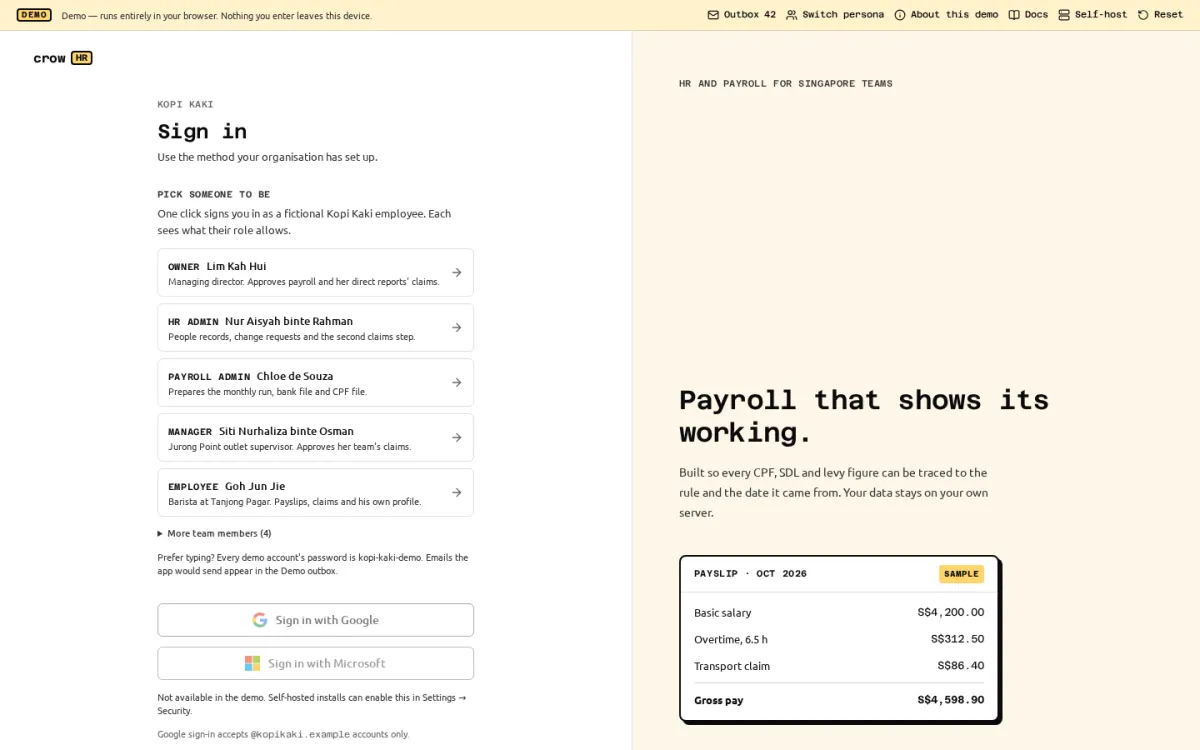
Crow HR has an in-browser demo: the same web app and the same API code that a self-hosted install runs, started inside the visitor’s browser instead of on a server. Try it at hr.crow.sg, next to these docs. You can also build and open it on your own machine (see running it locally) or install Crow HR.
How it works
Section titled “How it works”- No backend. The site is static files. The Crow HR API runs in a Web Worker in your tab, against PostgreSQL compiled to WebAssembly (PGlite), saved in your browser’s IndexedDB. Nothing you type reaches a server, and there are no analytics or third-party requests.
- The real code. Payroll is calculated by the real engine with the cited Singapore rules, approvals go through the real workflow engine, and permissions are enforced by the same server code as a self-hosted install.
- Your own copy. Each browser gets its own database, restored from a pre-built, gzip database snapshot on the first visit; if that download is missing or corrupt, the same seed runs in your browser. Local fresh-visit measurements improved from a 4.93 s median to 1.20 s (three Chromium samples each). Reset in the demo banner wipes your copy, restores the snapshot and re-anchors the clock; clearing the site’s data in your browser does the same. When a new version of the demo changes its data, your next visit starts from a fresh copy automatically.
- One tab at a time. Two tabs writing the same local database would corrupt it, so a second tab offers to take over instead.
The demo company
Section titled “The demo company”Kopi Kaki Pte. Ltd. is a fictional café group with an office, a central kitchen and three outlets: 27 people across citizens, permanent residents in their first, second and later years, Employment Pass, S Pass and Work Permit holders, every self-help group fund, part-timers and employees on each CPF age boundary. Every name, NRIC/FIN, bank account and email address is invented.
July to September 2026 payroll is approved and paid; October is a computed draft with warnings. Published rosters cover October and the next week at all three outlets, with OPN, AM, MID and PM shifts. October clock-ins include late arrivals and overtime approved by managers; that OT feeds the October draft through attendance. Siti has a shift swap waiting in her Inbox. Recent hires have generated KET PDFs; Darren and Jun Jie have terms to acknowledge. HR can review a fictional work-pass document expiring on 20 Nov. The payroll cost report draws on the three paid months. Everyone has a preferred name, managers are classified as managers, and every persona has work on Home. The history was created through the real services and the public API, as the person who would have done each step.
Sign in with one click as one of five personas, or type any seeded account’s email with the shared password kopi-kaki-demo:
| Persona | Name | What they do in the demo |
|---|---|---|
| Owner | Lim Kah Hui | Managing director. Approves payroll and her direct reports’ claims. |
| HR admin | Nur Aisyah binte Rahman | People records, change requests and the second claims step. |
| Payroll admin | Chloe de Souza | Prepares the monthly run, bank file and CPF file. |
| Manager | Siti Nurhaliza binte Osman | Jurong Point outlet supervisor. Approves her team’s claims, leave and a pending shift swap. |
| Employee | Goh Jun Jie | Barista at Tanjong Pagar. Payslips, claims, schedule and a document to acknowledge. |
What differs from a self-hosted install
Section titled “What differs from a self-hosted install”| Area | In the demo | Self-hosted |
|---|---|---|
| Signing in | One click on a persona, or the shared password. Two-step verification is not required. | Email and password, two-step verification (required for admin roles by default), SSO. |
| Google, Microsoft, Singpass | Buttons are shown but disabled; no request is made to any identity provider. A demo build can switch on a real Singpass login: you log in, nothing about you is kept, and you then choose HR admin or Employee. On hr.crow.sg that waits for Singpass to approve the production app. | Work once an owner configures them. |
| Nothing is sent. Messages appear in the Demo outbox (from the banner), so invitation and reset links still work. | Sent over SMTP if configured. | |
| Passwords | PBKDF2 in a demo-only format that a real server refuses. | argon2id. |
| Encryption at rest | NRIC/FIN and bank numbers are encrypted with a throwaway key included with the fictional snapshot and stored next to the database. The fallback seed creates a fresh key. Fine for invented data, never a pattern for real data. | Encrypted with the server’s CROWHR_SECRET_KEY. |
| Date | The company lives on 31 Oct 2026: the clock starts there at your Singapore time of day, then runs normally. Reset re-anchors it. | The real date. |
| Uploaded files | Stored in the browser database. | Stored on the server’s disk volume. |
| Background jobs | Reminders, escalations and the outbox run every 30 seconds while a demo tab is open, and catch up on the next visit. | Every 60 seconds in the server process. |
| Backups and system status | Not applicable. | Daily pg_dump to the backups volume. |
What the demo does not show
Section titled “What the demo does not show”- July–September overtime is historical payroll input. October OT comes from approved attendance; its joiner and leaver use explicit full-month scheduled-day denominators counted from the published outlet roster because the core roster feed covers whole-month tenures.
- Every run shows the
YTD_BEFORE_CROWHR_MISSINGwarning on purpose: the January–June opening balances are not imported, as for a company that moved to Crow HR mid-year. - Receipt previews and PDF or CSV downloads go through a service worker. Where service workers are unavailable (some private-browsing modes), those previews and downloads fail; everything else works.
- A tab closed in the middle of a request can lose that one request.
- Nothing is filed with CPF Board, IRAS or a bank, here or in the product: Crow HR produces the files for you to upload.
The demo’s own About this demo page (/about-demo) lists the same differences for visitors.
Running it locally
Section titled “Running it locally”From a checkout, with Bun installed:
bun installbun run demo:site # builds the demo and these docs into apps/demo/dist-sitenode apps/demo/scripts/serve.ts apps/demo/dist-site # http://127.0.0.1:5181The preview server applies the same headers and redirects as the static host would. Keep it on your own machine: the demo has a shared password and no real security, by design.