Running payroll
A payroll run covers one organisation and one calendar month. It moves through four states:
Draft (inputs editable) → In review (waiting for approval) → Approved → Paid (locked).
1. Create the run
Section titled “1. Create the run”Payroll → New payroll run. Choose the month and kind:
| Kind | Who is in it | Use it for |
|---|---|---|
| Monthly (regular) | Everyone employed in the month | The normal monthly payroll. One per month. |
| Off-cycle final pay | The employees you choose; they are then left out of that month’s regular run | Paying a leaver before the regular run. |
| Off-cycle bonus | One-off payments only | A bonus paid outside the regular run. CPF is recomputed for the whole month and the difference charged. |
| Adjustment | Created by reopening an approved or paid run | Corrections (see below). |
The pay date defaults from payroll settings.
2. Add the month’s items
Section titled “2. Add the month’s items”Basic pay and recurring allowances come from People. Some items arrive on their own from the other modules each time the run is computed (see items fed from other modules below); everything else is an item on the run, entered by hand:
- Earnings: bonus, commission, back pay, other earnings. Each is ordinary wages (OW) or additional wages (AW); an AW item needs the date it became due and payable, inside the run’s period (CPF keys the AW ceiling to that date).
- Overtime: minutes worked and the period in which they were worked. For employees covered by Part 4 of the Employment Act, the pay is computed with the statutory rate; for others, enter the contractual amount (the run blocks with
OT_NOT_STATUTORYuntil you do). - No-pay leave in days, hours for hourly-paid staff, and scheduled days / days worked for staff without a fixed working week, when they are not fed.
- Deductions, each in an Employment Act category (accommodation, amenities, damage or loss, advance, loan, unauthorised absence, court order or tax, co-operative society, written consent and others), plus CPF AW recovery for an AW top-up (see limitations).
Items fed from other modules
Section titled “Items fed from other modules”When the run is computed, Crow HR adds these items itself, each labelled with where it came from:
| Item | From | Rule |
|---|---|---|
| No-pay leave, unpaid infant care leave, unpaid company leave | Leave | Approved days in the run’s period, in half days. A no-pay leave item you enter for the same date replaces it. |
| Overtime | Attendance | Approved overtime claims for dates in the period. Items you enter are added on top, so don’t enter the same hours twice. |
| Days worked | Attendance | Rostered staff who clock in. An item you enter wins. |
| Scheduled days | Published rosters | Only when the whole month is published and the employee was employed all month. An item you enter wins. |
| Claims reimbursement | Claims | Approved claims paid with payroll, approved by the end of the month and not yet paid. Shown under “Reimbursements (not wages)”: no CPF, not in gross pay. |
Bonus-only off-cycle runs take none of these. Fed overtime carries minutes only: for employees not covered by Part 4, or paid by the hour, the run blocks (OT_NOT_STATUTORY, OT_AMOUNT_REQUIRED) and the fed item can’t be given an amount, so pay their overtime as a manual item instead of approving it in attendance. Something approved after you computed the run makes Submit for approval ask you to recompute.
3. Compute and review
Section titled “3. Compute and review”Recompute calculates every employee from the current records and the items. The overview shows, in this order:
- Blocking issues and warnings, each with a code and a link to its source.
- Totals: people, gross pay, employee CPF, SHG, employer CPF, SDL, FWL estimate, claims and net pay.
- Changes since last month: joiners, leavers, pay changes, new items.
- The employee table: dense, numbers right-aligned. Move with the arrow keys or
j/k, open an employee with Enter, close with Escape, and step through employees in the drawer with[and].
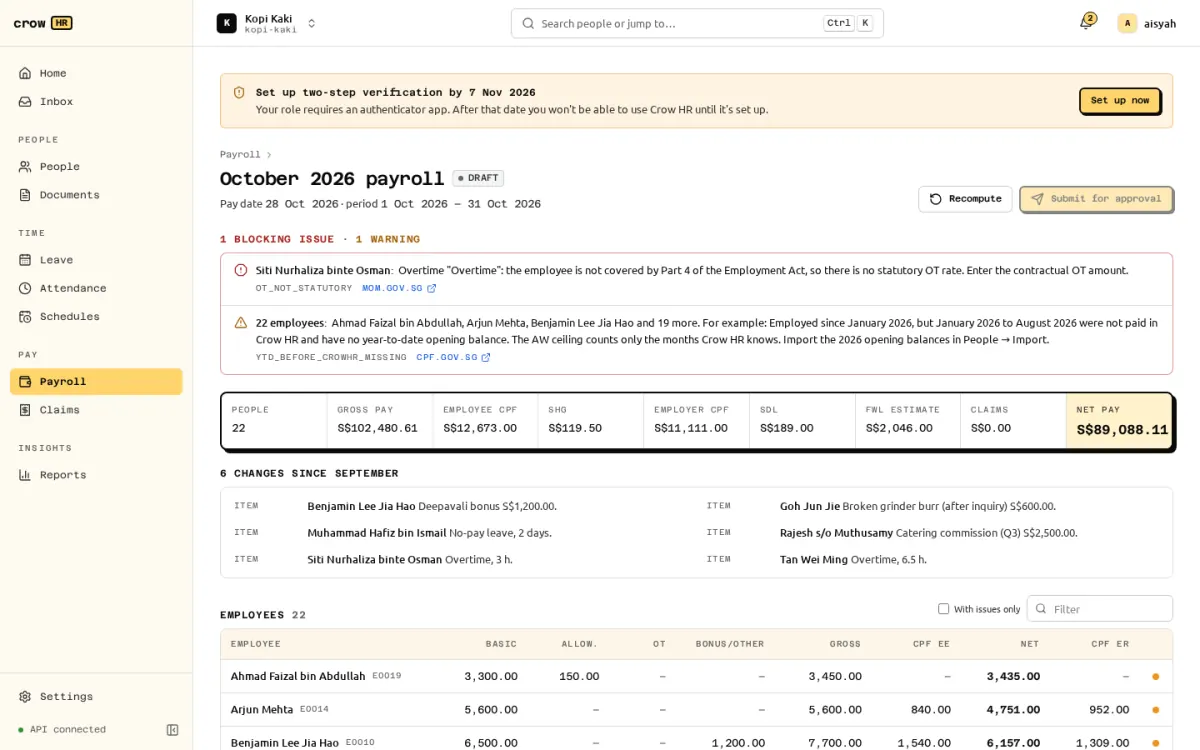
The drawer shows every line of that employee’s pay, the CPF working and the issues. See reading the CPF working.
Things that block submission:
- missing UEN, CSN or address on the company profile;
- a case the statutory engine refuses (for example
CPF_LOW_WAGE_CAPPED_AW_UNSUPPORTED): the rest of the run still computes; - deductions over the Employment Act limits (the 50% overall limit is only a warning on final pay);
- negative net pay;
- staff without a fixed week whose scheduled days and days worked are missing;
- an AW item dated outside the run’s period.
Warnings do not block: a pay date more than 7 days after the period (salary) or 14 days after the period in which overtime was worked, missing year-to-date opening balances, back pay owed from a retroactive change, rates for future years carried forward.
4. Submit and approve
Section titled “4. Submit and approve”Submit for approval needs a computation with no blocking issues whose inputs still match the records. If someone changed a salary or an item after you computed, submission fails with 409 and asks you to recompute.
The run goes through the approvals engine as a payroll_run request with the net total. By default an owner approves. An owner who submitted the run may approve it themselves when nobody else can; that decision is recorded as self-approved. A rejection returns the run to draft with the approver’s comment. You can withdraw a run in review back to draft.
5. Release, pay, file
Section titled “5. Release, pay, file”After approval:
- Release payslips (unless automatic release is on). Employees then see them under Payslips. See payslips.
- Download the CPF EZPay file and upload it in CPF EZPay.
- Download the bank file (needs a recent sign-in) and upload it to your bank, or pay another way.
- Mark paid once the money has gone out. This locks the run and marks the claims it reimbursed as paid, dated the pay date.
Crow HR does not submit anything to CPF Board, IRAS or your bank itself.
Correcting an approved or paid run
Section titled “Correcting an approved or paid run”Reopen as an adjustment creates an adjustment run for the same month, starting from a copy of the original inputs, with a reason kept in the audit log. The original run, its payslips and its files never change; it is marked superseded only when the adjustment is approved. The adjustment charges only the difference in CPF, SHG and SDL, its payslips are labelled as a revision and show the net amount still to pay (or overpaid), and its EZPay file is a supplementary file.
Adjustments do not recompute later months. If you reopen a month after later months were finalised, Crow HR warns; CPF’s year-end (or last-month) AW recomputation absorbs the difference.
Every result is reproducible
Section titled “Every result is reproducible”Each employee’s result is computed from a stored snapshot of their inputs and the rate tables used. Inputs and results are stored with SHA-256 hashes, and recomputing a snapshot gives a byte-identical result, so you can show later exactly how a figure was produced.
When an administrator enters or edits earnings for themselves, the approval summary names them as having entered their own earnings. They cannot approve that run, even if they also hold the owner role. Another eligible owner must decide it. The flag remains if the item is later changed or removed, preserving the audit trail.
Leave encashment
Section titled “Leave encashment”Approved leave encashment enters the next regular payroll automatically (approval must precede both its pay date and period end), or a leaver’s off-cycle Final pay run. It appears in the run’s change list and as Leave encashment (N days) on the payslip. Hour-based balances show hours. The payslip working records basic pay + each included fixed allowance → monthly gross → daily gross rate, effective schedule, rate date, quantity and rounding. See Encash unused leave for requesting and approval.
The daily gross rate is 12 × (monthly basic salary + included fixed recurring allowances) / (52 × average workdays per week), following MOM’s annual-leave encashment basis. Salary and allowances use their effective records on the request’s rate date (cessation date for someone who has already left). Only allowance types explicitly marked grossRateIncluded: true enter the gross rate; excluded variable payments do not. An unclassified active allowance blocks the request. The exact rate is multiplied by the days and rounded once half up to integer cents; intermediate rates are not rounded. Existing requests keep their snapshotted amount and working when salary or allowances change.
Accumulated unused leave is AW and CPF-liable, including on termination: CPF leave encashment FAQ, OW/AW classification. Unused-leave wages are distinct from non-CPF termination compensation. The normal AW ceiling applies, with the existing cessation-year reconciliation for leavers. Post-cessation CPF eligibility requires SC/SPR status at cessation and when AW is payable.
Compute reserves each earning for one run. Recompute retains it, another run excludes it, and adjustments preserve its original amount and payable date while paying only the overall net difference. Draft and rejected payrolls keep their reservations for recompute. Deleting a draft releases them so another run can pick them up. Bonus-only runs do not pick up encashments. Existing year-end leave entries require HR to submit their payout for approval; they never pay automatically without a decision.